

Description
Download Workouts – Workout Planner, Exercise Tracker, Fitness App
Overview
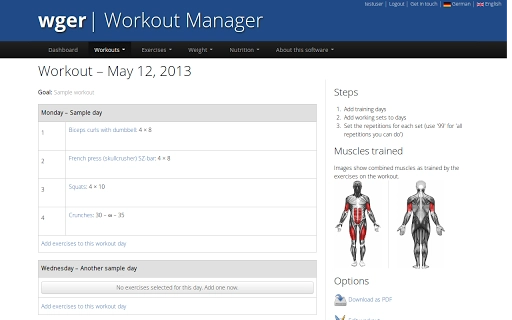
Workouts is a desktop application designed to help users create and manage personalized fitness routines with full control over training schedules, exercise selection, and progress tracking. The software enables individuals to design custom workout plans by selecting specific training days and assigning corresponding exercises, sets, and repetitions. For those following structured programs, the app organizes workouts into scheduled timelines, simplifying long-term planning. A built-in exercise database provides detailed performance instructions and identifies target muscle groups, ensuring proper form and effective training. Users can also add custom exercises when needed. The application supports tracking both body weight and exercise-specific weights, with visual graphs to monitor progress over time. Additionally, a nutrition module allows users to build daily meal plans and analyze nutritional content, including energy, protein, carbohydrates, and more. Built-in BMI and calorie calculators assist in setting realistic dietary goals. The software is free and open-source under the GPL license, emphasizing transparency and user privacy. It operates with a secure HTTPS connection and stores data locally, with servers located in Germany, reinforcing its commitment to data protection. This makes it suitable for fitness enthusiasts, athletes, and individuals focused on health and bodyweight training who prefer a reliable, privacy-first desktop tool.
Key Features & Capabilities
- Custom Workout Creation – Users can define training days and assign exercises, sets, and repetitions to build personalized routines. Ideal for tailoring programs to specific goals such as strength, endurance, or muscle hypertrophy.
- Exercise Database with Form Guidance – A comprehensive library of exercises includes detailed instructions on proper execution and identifies which muscles are engaged. This supports safe and effective training, especially for beginners.
- Progress Tracking via Weight Log – Track body weight and exercise weights over time. Graphical visualizations help users identify trends and measure improvements in strength and body composition.
- Nutrition Planning with Nutritional Analysis – Create daily meal plans and instantly view nutritional breakdowns, including calories, protein, fats, and carbohydrates. Integrated BMI and calorie calculators help users align their diet with fitness objectives.
- PDF Export for Gym Use – Completed workout plans can be exported as printable PDFs, allowing users to carry their schedules to the gym without relying on digital devices.
- Program Scheduling – For users following structured fitness programs, workouts are grouped into logical schedules, making long-term planning and adherence easier.
- Open-Source & Privacy-Focused Design – The software is free under the GPL license and uses secure HTTPS connections. Data remains on the user’s device, with servers hosted in Germany, ensuring strong privacy protections.
User Interface, Workflow & Performance
The user interface of Workouts is structured around a clean, intuitive layout that prioritizes accessibility and ease of navigation. Core functions such as creating routines, accessing the exercise database, and logging progress are organized into clearly labeled sections. The workflow follows a logical sequence: users begin by selecting training days, then add exercises with specified sets and repetitions. The app supports a drag-and-drop approach for reordering exercises within a session, enhancing usability. Navigation between modules—workouts, exercises, nutrition, and weight tracking—is consistent and straightforward. The application operates efficiently on standard desktop systems, with no reported performance bottlenecks. The developer did not specify resource usage details, but general software behavior suggests minimal CPU and RAM consumption. Stability appears reliable, with no known issues reported. The app runs without requiring constant internet access, making it suitable for offline use. Users can work on their fitness plans without interruptions, ensuring a smooth experience whether at home or in the gym. The interface is responsive and adapts well to different screen sizes, providing a consistent experience across Windows, Mac, Linux, and Chrome OS platforms.
Compatibility & System Requirements
Workouts is available for Windows, Mac, Linux, and Chrome OS, making it accessible across a wide range of desktop environments. The software supports multiple operating systems, allowing users to choose the platform that best fits their workflow. The developer did not provide specific version numbers, installation size, or hardware requirements. Exact system requirements were not listed. Compatibility information was partially provided, with no indication of minimum processor speed, RAM, or storage needs. The application is designed as a desktop utility and does not require specialized hardware. It is expected to function on modern systems with standard configurations. Since the software is open-source and distributed via web-based download, users can verify integrity through checksums or source code. The developer emphasized secure HTTPS connections during download, ensuring a safe installation process. Platform compatibility is confirmed for the listed operating systems, though detailed technical specifications remain unspecified.
Pros and Cons
Pros
- Free and open-source under the GPL license
- Strong privacy focus with German-based servers and secure HTTPS
- Comprehensive exercise database with form instructions
- Integrated nutrition planning with real-time nutritional analysis
- Visual progress tracking through graphical weight logs
- PDF export for physical gym use
- Supports both custom routines and structured program scheduling
- Available on Windows, Mac, Linux, and Chrome OS
Cons
- Exact system requirements were not specified
- Version number and file size information are missing
- No built-in mobile companion app or cloud sync
- Performance details such as CPU/RAM usage were not provided
- Interface may require a learning curve for complete beginners
FAQ Section
Is Workouts available for Windows, Mac, and Linux?
Yes, Workouts is compatible with Windows, Mac, Linux, and Chrome OS, offering broad platform support for desktop users.
Is the software free to use?
Yes, Workouts is free and distributed under the GPL open-source license, allowing users to download, use, and modify the software at no cost.
Does Workouts require an internet connection?
The application can function offline once installed. However, secure HTTPS connections are used during download and updates.
Is my data stored securely?
Yes, the software emphasizes privacy. Data is stored locally on the user’s device, and servers are located in Germany. The app uses HTTPS for secure communication.
Can I sync my data across devices?
Currently, there is no built-in cloud sync or mobile companion app. Data remains on the local device and is not automatically shared across platforms.
Final Thoughts + CTA
Workouts stands out as a powerful, privacy-conscious desktop tool for fitness planning and tracking. Its ability to create custom routines, manage nutrition, and monitor progress through visual graphs makes it a versatile solution for anyone serious about their fitness journey. The inclusion of a detailed exercise database, PDF export, and structured program scheduling enhances usability for both beginners and experienced users. With strong privacy protections and cross-platform availability, it appeals to users who value control over their data. While some technical details like system requirements and version information are missing, the software’s core functionality remains robust and reliable. For those seeking a free, secure, and feature-rich fitness application without the need for subscriptions or cloud dependency, Workouts delivers significant value. Download Workouts now.
Guides & Tutorials for wger Workout Manager App for Chrome
How to install wger Workout Manager App for Chrome
- Click the Preview / Download button above.
- Once redirected, accept the terms and click Install.
- Wait for the wger Workout Manager App for Chrome download to finish on your device.
How to use wger Workout Manager App for Chrome
This software is primarily used for its core features described above. Open the app after installation to explore its capabilities.
User Reviews for wger Workout Manager App for Chrome 0
No reviews found





